
 }})

- Joined
- Apr 13, 2014
- Messages
- 2,426
- Reaction score
- 0
- Points
- 36
- Military Branch

- Rival Allegiance

So, you like to play at being a GM and toying with contracts then this is a rather fun way to do so. With all of the rumblings about Cousins upcoming contract I wanted to come up with a way of looking at 'What If?' scenarios that I could compare. Over the Cap has a good one but you can't save and review any changes later. This can be used for any players contract you want to screw around with.
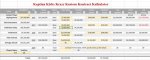
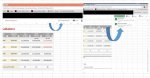
Here's the Excel program that I came up with for contracts. The link goes to the OneDrive version of Excel that you can use there. To enter anything you'll need to click on 'Edit Workbook' (upper right hand side - see 2nd screen shot below) and choose either 'Edit in Excel' or 'Edit in Excel Online'. Edit in Excel Online is probably best - you don't have to download anything and you just put in your info right there. The yellow shaded fields are the ones you put your numbers in - everything else is calculated and totaled.
It's a little clunky for moving around online because the arrow keys won't pass over the protected grey or white fields to get to the editable yellow ones so you mostly have to click on each cell. The protected ones have formulas and such in them so that's why they're protected. You can download the file as a copy but to change anything you'd have to Enable Editing which is smoother as the arrow keys then work as intended and the protected fields are still protected. You could use the OneDrive version and download a copy after you've filled in the blanks and leave the file in protected mode to save and view later.
You can't get to the protected cells unless you download the file, enable editing and unprotect the sheet which anybody is welcome to do so. There is no password to unprotect the book.
And there are some notes there that help to clarify (possibly) how to enter stuff.
the link is: http://1drv.ms/1RLxheO
Below is a screenshot
Below is a ScreenShot of the tab for Edit Notebook for the online version of Excel.
Here's the Excel program that I came up with for contracts. The link goes to the OneDrive version of Excel that you can use there. To enter anything you'll need to click on 'Edit Workbook' (upper right hand side - see 2nd screen shot below) and choose either 'Edit in Excel' or 'Edit in Excel Online'. Edit in Excel Online is probably best - you don't have to download anything and you just put in your info right there. The yellow shaded fields are the ones you put your numbers in - everything else is calculated and totaled.
It's a little clunky for moving around online because the arrow keys won't pass over the protected grey or white fields to get to the editable yellow ones so you mostly have to click on each cell. The protected ones have formulas and such in them so that's why they're protected. You can download the file as a copy but to change anything you'd have to Enable Editing which is smoother as the arrow keys then work as intended and the protected fields are still protected. You could use the OneDrive version and download a copy after you've filled in the blanks and leave the file in protected mode to save and view later.
You can't get to the protected cells unless you download the file, enable editing and unprotect the sheet which anybody is welcome to do so. There is no password to unprotect the book.
And there are some notes there that help to clarify (possibly) how to enter stuff.
the link is: http://1drv.ms/1RLxheO
Below is a screenshot
Below is a ScreenShot of the tab for Edit Notebook for the online version of Excel.